PROCEDURES: Uninstall Angents
These procedures utilize the Deploy-Agent PowerShell module (262COS-CVAH_Agent_Deployer-SCRIPT-001) to deploy agents.
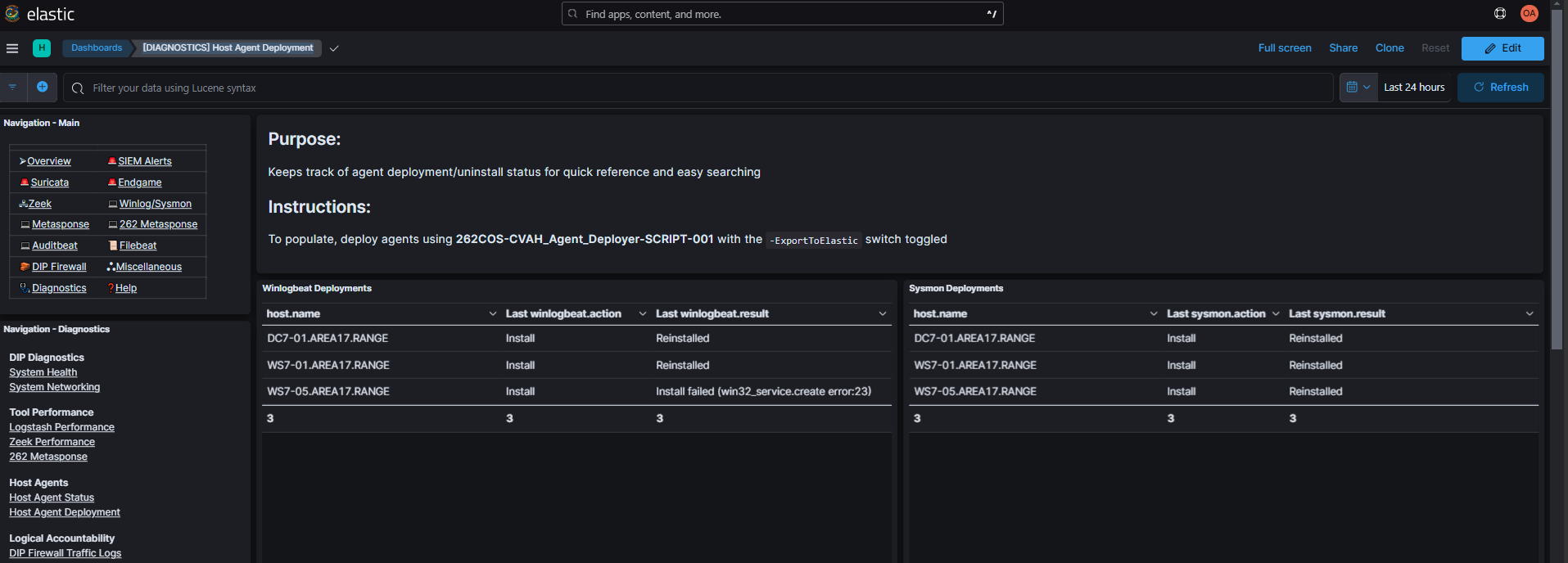
The -ElasticURL $ElasticURL -ElasticPassword $ElasticPassword -ExportToElastic parameters will stream script execution logs to the Elasticsearch agent-deployer index, enabling you to view them in the [DIAGNOSTICS] Host Agent Deployment Kibana dashboard (Diagnostics -> Host Agent Deployment):
Procedures
Copy the content for the corresponding deployment option into your PowerShell_ISE.exe console and populate the required variables (<##########>) with their actual filepaths/values:
- Standard Deployment
- TFPlenum Standard Deployment
- Sysmon
- Endgame
- Winlogbeat
- Filebeat
- Auditbeat
- Metricbeat
Standard Deployment
- The "standard" deployment is considered:
Host Agent Windows Linux Winlogbeat ✅ ❌ Sysmon ✅ ❌ Endgame ✅ ✅
- The same version Sysmon binary used to install Sysmon is also required to uninstall it.
- The same Endgame binary and config used to install Endgame is also required to uninstall it.
Command Template
$ElasticURL="https://elasticsearch.<KIT_DOMAIN>:9200"
$ElasticPassword='<ELASTIC_PASSWORD>'

$SysmonExe="<SYSMON_x86_EXE>"
$Sysmon64Exe="<SYSMON_x86_64_EXE>"

$EndgameExe="<ENDGAME_WINDOWS_INSTALLER>"
$EndgameBin="<ENDGAME_LINUX_INSTALLER>"
$EndgameWinConfig="<ENDGAME_WINDOWS_CONFIG>"
$EndgameNixConfig="<ENDGAME_LINUX_CONFIG>"
$EndgameAPIKey="<ENDGAME_API_KEY>"

Deploy-Agent -ComputerName $Targets `
    -ElasticURL $ElasticURL -ElasticPassword $ElasticPassword -ExportToElastic `
    -Credential $Credential -SSHCredential $SSHCredential `
    -SysmonExe $SysmonExe -Sysmon64Exe $Sysmon64Exe `
    -EndgameExe $EndgameExe -EndgameWinConfig $EndgameWinConfig `
    -EndgameBin $EndgameBin -EndgameNixConfig $EndgameNixConfig `
    -EndgameAPIKey $EndgameAPIKey `
    -UninstallEndgame -UninstallSysmon -UninstallWinlogbeat
TFPlenum Standard Deployment
- NOTE: "Vanilla" CVA/H *Beats agents are OUTDATED (
v7.16.3as of CVA/H3.8.3) - The "standard" deployment is considered:
Host Agent Windows Linux Winlogbeat ✅ ❌ Sysmon ✅ ❌ Endgame ✅ ✅
- The same version Sysmon binary used to install Sysmon is also required to uninstall it.
- The same Endgame binary and config used to install Endgame is also required to uninstall it.
- The
-TFPlenumInstallerZipoption will automatically extract the TFPlenum host agent zip and uninstallSysmonandWinlogbeat, andEndgamefrom Windows systems, and onlyEndgamefrom Linux systems.
Command Template
$ElasticURL="https://elasticsearch.<KIT_DOMAIN>:9200"
$ElasticPassword='<ELASTIC_PASSWORD>'

$TFPlenumInstallerZip="<TFPLENUM_HOST_AGENT_INSTALLER_ZIP>"
$EndgameAPIKey="<ENDGAME_API_KEY>"

Deploy-Agent -ComputerName $Targets `
    -ElasticURL $ElasticURL -ElasticPassword $ElasticPassword -ExportToElastic `
    -Credential $Credential -SSHCredential $SSHCredential `
    -TFPlenumInstallerZip $TFPlenumInstallerZip -EndgameAPIKey $EndgameAPIKey `
    -UninstallEndgame -UninstallSysmon -UninstallWinlogbeat
Sysmon
Reinstalling Sysmon multiple times on the same system may eventually cause the service to go into a state where it will not be removed until the machine reboots, preventing reinstallation until a reboot occurs. It is highly recommended to identify if Sysmon is already present, and if it is worth the risk to update the Sysmon install.
The same version Sysmon binary used to install Sysmon is also required to uninstall it.
Command Template
$ElasticURL="https://elasticsearch.<KIT_DOMAIN>:9200"
$ElasticPassword='<ELASTIC_PASSWORD>'

$SysmonExe="<SYSMON_x86_EXE>"
$Sysmon64Exe="<SYSMON_x86_64_EXE>"

Deploy-Agent -Credential $Credential -ComputerName $Targets `
    -ElasticURL $ElasticURL -ElasticPassword $ElasticPassword -ExportToElastic `
    -SysmonExe $SysmonExe -Sysmon64Exe $Sysmon64Exe `
    -UninstallSysmon
Endgame
- The
-Credentialoption is used if interacting with Windows hosts and the-SSHCredentialoption is used if interacting with Linux hosts. They can be used together or individually. - The
-EndgameExe/-EndgameWinConfigoptions are used if deploying to Windows hosts and the-EndgameBin/-EndgameNixConfigoptions are used if deploying to Linux hosts. They can be used together or individually. - The same Endgame binary and config used to install Endgame is also required to uninstall it.
Command Template
$ElasticURL="https://elasticsearch.<KIT_DOMAIN>:9200"
$ElasticPassword='<ELASTIC_PASSWORD>'

$EndgameExe="<ENDGAME_WINDOWS_INSTALLER>"
$EndgameBin="<ENDGAME_LINUX_INSTALLER>"
$EndgameWinConfig="<ENDGAME_WINDOWS_CONFIG>"
$EndgameNixConfig="<ENDGAME_LINUX_CONFIG>"

Deploy-Agent -ComputerName $Targets `
    -ElasticURL $ElasticURL -ElasticPassword $ElasticPassword -ExportToElastic `
    -Credential $Credential -SSHCredential $SSHCredential `
    -EndgameExe $EndgameExe -EndgameWinConfig $EndgameWinConfig `
    -EndgameBin $EndgameBin -EndgameNixConfig $EndgameNixConfig `
    -UninstallEndgame
Winlogbeat
Command Template
$ElasticURL="https://elasticsearch.<KIT_DOMAIN>:9200"
$ElasticPassword='<ELASTIC_PASSWORD>'

Deploy-Agent -Credential $Credential -ComputerName $Targets `
    -ElasticURL $ElasticURL -ElasticPassword $ElasticPassword -ExportToElastic `
    -UninstallWinlogbeat
Filebeat
- The
-Credentialoption is used if interacting with Windows hosts and the-SSHCredentialoption is used if interacting with Linux hosts. They can be used together or individually. - The
-FilebeatExe/-Filebeat64Exeoptions are used if deploying to Windows hosts and the-FilebeatBin/-Filebeat64Binoptions are used if deploying to Linux hosts. The Linux and Windows options can be used together or individually/separately.
Command Template
$ElasticURL="https://elasticsearch.<KIT_DOMAIN>:9200"
$ElasticPassword='<ELASTIC_PASSWORD>'

Deploy-Agent -ComputerName $Targets `
    -ElasticURL $ElasticURL -ElasticPassword $ElasticPassword -ExportToElastic `
    -Credential $Credential -SSHCredential $SSHCredential `
    -UninstallFilebeat
Auditbeat
- The
-Credentialoption is used if interacting with Windows hosts and the-SSHCredentialoption is used if interacting with Linux hosts. They can be used together or individually. - The
-AuditbeatExe/-Auditbeat64Exeoptions are used if deploying to Windows hosts and the-AuditbeatBin/-Auditbeat64Binoptions are used if deploying to Linux hosts. The Linux and Windows options can be used together or individually/separately.
Command Template
$ElasticURL="https://elasticsearch.<KIT_DOMAIN>:9200"
$ElasticPassword='<ELASTIC_PASSWORD>'

Deploy-Agent -ComputerName $Targets `
    -ElasticURL $ElasticURL -ElasticPassword $ElasticPassword -ExportToElastic `
    -Credential $Credential -SSHCredential $SSHCredential `
    -UninstallAuditbeat
Metricbeat
- The
-Credentialoption is used if interacting with Windows hosts and the-SSHCredentialoption is used if interacting with Linux hosts. They can be used together or individually. - The
-MetricbeatExe/-Metricbeat64Exeoptions are used if deploying to Windows hosts and the-MetricbeatBin/-Metricbeat64Binoptions are used if deploying to Linux hosts. The Linux and Windows options can be used together or individually/separately.
Command Template
$ElasticURL="https://elasticsearch.<KIT_DOMAIN>:9200"
$ElasticPassword='<ELASTIC_PASSWORD>'

Deploy-Agent -ComputerName $Targets `
    -ElasticURL $ElasticURL -ElasticPassword $ElasticPassword -ExportToElastic `
    -Credential $Credential -SSHCredential $SSHCredential `
    -UninstallMetricbeat